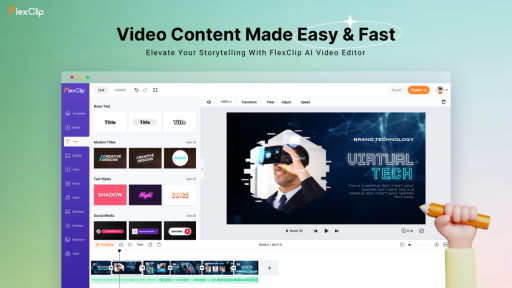


When it comes to video editing, options are everywhere—some are too basic, some are too complex, and very few strike the right balance. FlexClip claims to be an all-in-one online video editor that combines simplicity with powerful tools. But does it really deliver?
Let’s break it down with a no-fluff Q&A review to help you decide if FlexClip is worth your time.
What is FlexClip in a nutshell?
FlexClip is a browser-based video editor that allows users to create, edit, and export videos without downloading any software. It supports everything from personal slideshows to commercial ads, YouTube intros, educational content, and even TikTok clips.
Everything happens in the cloud—just open your browser, log in, and start editing.
How easy is it to use?
FlexClip’s interface is designed for non-professionals. The editing timeline is straightforward, and everything works by dragging, dropping, or clicking. Want to add music? Click. Need to insert text? Click. Want to animate it? Click again.
There’s almost zero learning curve, which is rare in the world of video editors.
What tools and features stand out the most?
Here are some highlights:
- AI Text-to-Video: Paste your script, and FlexClip auto-generates a video with scenes, music, and voiceovers.
- AI Image-to-Image & Face Swap: Create new images from old ones, change styles, or swap faces for fun or branding.
- Templates + Stock Assets: Thousands of templates and millions of royalty-free video clips, photos, and music tracks.
- Screen & Webcam Recording: Great for tutorials, reaction videos, or online lessons.
What can I actually make with it?
Almost anything that doesn’t require Hollywood-level editing.
- Marketing promos
- Product demos
- Vlogs and travel videos
- Social media content (Instagram Reels, TikToks)
- Wedding videos
- Tutorials and educational content
- Corporate intros and presentations
FlexClip also supports different aspect ratios, so your video can be optimized for YouTube, Facebook, Instagram, or even vertical smartphone screens.
Is it free? And what’s the cost if I upgrade?
Yes, there is a free plan, but it’s limited. You can create short videos with basic features and a watermark. Export quality is also restricted to 480p.
Here’s the breakdown of paid options:
Plus – $19.99/month: 1080p, more media assets, longer video duration
Business – $29.99/month: Full access to all AI tools, branding features, 1000+ templates, and more
Honestly, for what it offers, the Business plan is quite cost-effective—especially when compared to the cost of hiring editors or paying for separate stock libraries.
Are there any downsides?
Every tool has limitations, and FlexClip is no exception:
Internet Dependent: No offline mode. Everything runs in the browser, so a poor connection can slow you down.
Watermark on Free Plan: Standard for most freemium tools, but worth noting if you’re planning to use it professionally.
User Rating: 4.5/5
| Category | Score |
| Ease of Use | ★★★★★ |
| Features | ★★★★☆ |
| AI Integration | ★★★★★ |
| Performance Speed | ★★★★☆ |
| Value for Money | ★★★★★ |
Final Thoughts
FlexClip is not trying to be a professional-grade editor, and that’s exactly why it works. It delivers fast, flexible, and AI-enhanced video editing in a way that’s accessible to just about anyone—no technical skills required.
Whether you’re making a birthday video, an Instagram ad, or a pitch deck with narration, FlexClip lets you do it in minutes. If your priority is convenience without sacrificing quality, it’s absolutely worth checking out.